System Updates
September 20 – 26, 2026
New
Nothing New This Week
Improved
ShipStation Package Selection Now Available for All Applicable OrdersStores with ShipStation connected can now select a ShipStation package for online orders no matter which shipping rate method they use — previously this only worked for stores using ShipStation's own rates.
Move Between Products on the Edit Product Page with Next / Previous ButtonsWe have added Previous and Next buttons to the Edit Product page to let you jump to the next or previous product in your list without having to go back to the Product List. The buttons follow your current sort and filter, disable at the first and last product, and support keyboard shortcuts plus give you a heads-up if you have unsaved changes.
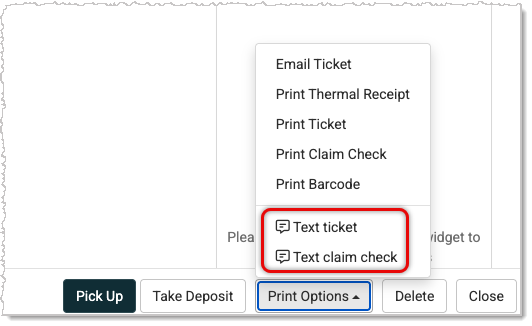
Text Work Order Ticket or Claim Checks to CustomersYou can now text a Work Order ticket or claim check straight to a customer's phone from the Print Options menu. The option is grayed out with a reason shown if you're not messaging-enabled, if the customer has no mobile number on file, or if they've opted out.
 Spreadsheet Imports Now Match Column Headers Regardless of Case
Most spreadsheet imports now match column headers no matter the case, so "Status" and "status" are treated the same. If a spreadsheet has two columns with the same name in different cases, you'll now see a clear error instead of the import silently picking the wrong one.
Orders Page ModernizedWe refreshed the design and functionality of the Orders page for a more consistent, up-to-date experience.
Top Customers Report ModernizedWe refreshed the design and functionality of the Top Customers Report for a more consistent, up-to-date experience.
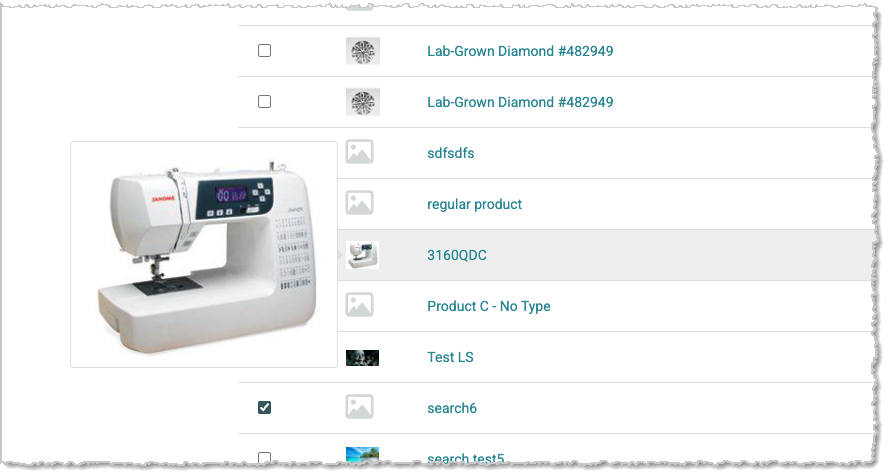
Larger Image Preview on Hover on the Products PageYou can now hover over a product thumbnail on the Products page to see a larger preview, positioned to the left so it doesn't cover the product title — an easy way to spot the right product without having to open each one.
Fixed
Scheduled Sales Fail Silently on Invalid Rounding ValuesWe fixed an issue where entering a rounding value outside the expected range (like rounding to the nearest $5 instead of a cent ending) could make a Scheduled Sale silently fail, with prices never updating and no error shown. Rounding values are now validated at entry — anything outside .00–.99 is rejected immediately with a clear message, an example, and a pop-up on hover tooltip.
Inventory Not Updating Immediately After a Register SaleWe've fixed an issue where searching for an item right after a Register transaction still showed the old inventory count until the page refreshed.
Message Unclear When a Card Can't Be Saved on FileWe resolved an issue where a prepaid or gift card that couldn't be saved on file showed a broken, empty entry instead of an explanation.
Removed Customers No Longer Appearing on Waitlist ReportWe corrected an issue where customers removed from a Class waitlist kept showing up on the Waitlist Report because the report's cache wasn't updating.
Order Displaying Billing Address Instead of Shipping AddressWe fixed an issue where orders with Shipping created in the Register showed the customer's billing address instead of their shipping address on the finalized order, even when the two differed.
Purchase Order Discount Displaying Incorrectly on Receiving OrderWe've fixed an issue where Purchase Order line-item discounts weren't calculating correctly once the item reached the Receiving Order, showing the wrong unit cost on screen — even though the printed RO reflected the correct discounted price.
Website Editor Not Working With Some Embedded Items and LinksWe resolved an issue where the Content Editor removed necessary attributes from embedded iframes (like Google Maps embeds) and stripped the target="_blank" attribute from links, breaking embedded content and keeping links from opening in a new tab.
Assign Till Prompt Appearing Too Early on Customer ProfilesWe corrected an issue where opening a customer's profile from the Customers list immediately triggered the Assign Till prompt, even if you weren't working with that customer's Work Orders. Now the prompt only appears when you actually interact with the Work Orders tab.
Inventory Accuracy on Consignment ContractsWe fixed an issue where some Consignment contracts showed inventory added twice for the same item. Editing certain line details required removing and re-adding the item, and that removal wasn't tracked — making it look like the item had arrived a second time. Removing a line now properly releases its inventory and records the change, and items already sold, reserved, paid out, or returned to the consignor can no longer be removed, protecting those records.
Adding a Location Resets Store Defaults Payment ProcessorWe've fixed an issue where adding a new store Location reset the payment processor configured under Store Defaults to No Default Set — breaking payment processing for locations relying on that default and disrupting card reader pairing.
Signature Line on Store Copy Receipt Overlapping TotalWe resolved an issue where the signature line on the store copy of printed receipts was misaligned and printed over the transaction total.
Inventory Transfer Received Dates Now AccurateWe corrected an issue where the receiving location for a Transfer showed the received date from the original location instead of the date the Transfer actually happened. Received dates now update correctly at both locations after a Transfer.
Loaner Module No Longer Creates DuplicatesWe fixed an issue where saving a Work Order could create a duplicate Loaner entry, which also blocked the original overdue Loaner from being completed and returning inventory to stock.
That's all for this week. Thank you for being part of the family. Take care, we love you!!


 September 28, 2026
Is this page helpful?
×Help us improve our articles