System Updates
November 16 - 22
New
Nothing New This Week
Improved
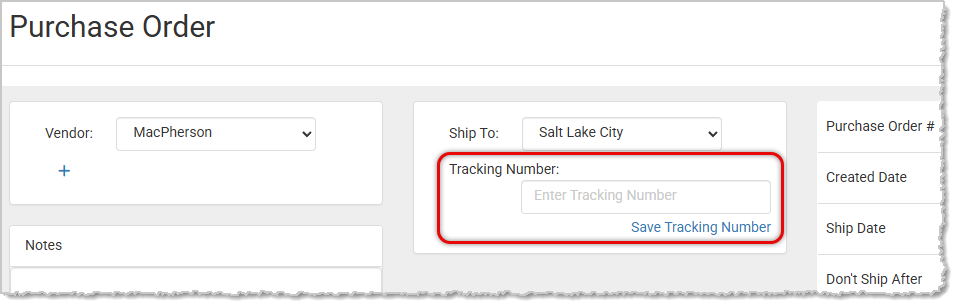
Tracking Number Field for Purchase Orders and Receiving Orders
We’ve added a new area in the Ship To section that allows users to associate a tracking number with their Purchase Orders. Once entered, the tracking number will also appear on the corresponding Receiving Order.
Fixed
Refund User Permissions Not Working CorrectlyWe resolved an issue where users without refund permissions could still access the Return Items option and process refunds. The system now correctly enforces permission settings, ensuring only authorized users can issue refunds.
Customer Group Restricted Coupons Not WorkingWe fixed an issue where coupons restricted to specific customer groups were not applying the discount.
Automated Invoice Emails Missing PDF AttachmentWe resolved an issue where monthly invoice statements automatically sent to customers were missing the PDF attachment.
Miscellaneous Item Department Not Respecting Discount RulesWe fixed an issue where miscellaneous items (the Misc Items you add in the Register that do not track inventory) were not following the rules of the department's discount eligibility.
Inventory Value Report Export Missing MonthSome stores were missing the month of October when exporting previous months from the Inventory Value Report. We have fixed this issue.
Missing Ship Date in Ordered Inventory ExportWe’ve resolved an issue where the Ship Date column was not being included when exporting the Ordered Inventory Report.
Form Style Receipt Missing Work Order InformationWe've fixed an issue with Form Style receipts where certain Work Order information such as quantity and price were showing up for some Work Orders but not for others.
Error on Curbside Pickup at CheckoutWe have resolved an issue when selecting Curbside Pickup at checkout where the system was loading the wrong pickup location or no location at all.
Incorrect Discount Display on InvoicesWe fixed an issue where payments applied to an invoice were mistakenly displayed in the Discount field, even when no discount was given.
Edit Customer Window Failing to LoadWe resolved an issue where the Edit Customer window was failing to load any customer data for specific customers.
Website Editor Navigation MissingWe have fixed an issue where the website editor navigation menu was missing when viewed from web pages containing the Blog module.
Suspended Transactions Not ResumingWe resolved an issue where suspended transactions could not be resumed. If a transaction was put on hold—such as when an employee paused the sale to retrieve a gift card—the system failed to load the suspended transaction afterward, preventing sales clerks from viewing or continuing it.
Claim Ticket Option Not Showing in New Print WindowWe've fixed an issue where the option to print a claim ticket for a Work Order deposit or pickup was not showing up in the new print window.
Unable to Delete Saved Card on FileWe resolved an issue where a customer’s saved card couldn’t be removed after an autopay error. Card deletion now works as expected.
Online Customers Able to Add to Waitlist with the Setting Turned OffWe fixed an issue where customers shopping for an out of stock product were able to add it to the waitlist even though the waitlist setting was turned off.
Marketing Email Subscription Not Respecting EditsWe have fixed an issue where any marketing email subscription changes made before the customer opted in to marketing emails were ignored once the customer confirmed from the opt-in email.
Product Not Populating Correct Price in RegisterWe fixed issues in the Register causing some item prices to not populate the correct price.
Some Picked Up Special Orders Showing as Ready for PickupWe've resolved an issue where Special Orders that had already been picked up were still showing as Ready for Pickup. This was happening in very rare cases when a Special Order was in the Register but one of the items was deleted before completing the transaction. We have corrected the data on those transactions.
That's all for this week. Thank you for being part of the Rain family. Take care, we love you!!


 November 26, 2025
Is this page helpful?
×Help us improve our articles